
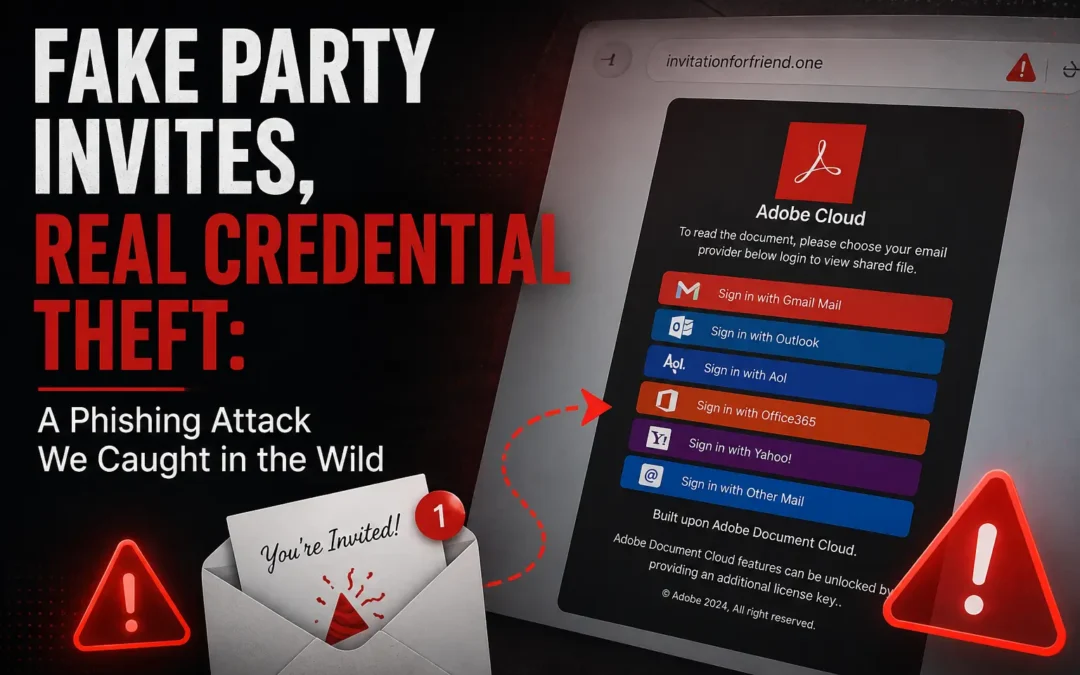
This one looked convincing. Here's what happened.
Earlier this week, we flagged a phishing attempt on a customer's machine that's worth sharing with everyone. A user received what appeared to be a friendly event invitation, clicked a link, and landed on a page designed to steal their email credentials. They almost handed them over without a second thought. Fortunately, we caught it in time, but not everyone will.
This type of attack is becoming more common, and it's effective precisely because it doesn't look like a cyberattack at all. It looks like an invitation to a party.
Want to see more content like this? Add us as a Preferred Source on Google to see more of our articles when you search.
What We Saw: The "Invitation-Based" Phishing Attack
The attack began with a message that felt completely harmless. A user received a link from what appeared to be a friend or acquaintance, directing them to view an event invitation. The domain in the address bar was invtationforfriend.one — not a legitimate platform, but easy to miss if you're not looking for it.
When the user clicked through, here's what they saw:
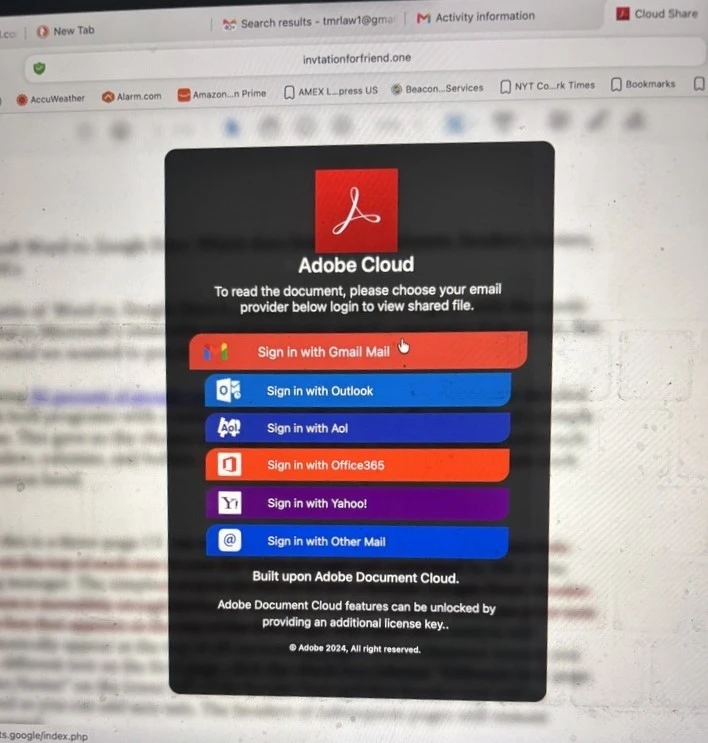
The page impersonated Adobe Document Cloud, claiming the user needed to log in with their email provider to view a shared file. It offered six sign-in options: Gmail, Outlook, AOL, Office365, Yahoo, and "Other Mail." It even displayed a fake copyright notice at the bottom: "© Adobe 2024, All right reserved."
That typo aside, the page looks polished at a glance. And that's exactly the point.
This Is Not Adobe. Not Even Close.
Adobe Document Cloud does not ask you to authenticate with your Gmail or Outlook credentials to view a file. That's not how it works. What you're looking at in that screenshot is a credential harvesting page, a fake login flow designed to capture whatever email address and password you enter.
We've seen variations of this kind of page before in our work, but this particular campaign is notable for a few reasons:
- It uses social trust as the entry point. The link came through what appeared to be a known contact, which lowers suspicion immediately.
- The branding is convincing enough to fool users who aren't looking critically. Adobe's logo and color scheme are right there.
- It targets multiple email providers at once, meaning the attackers don't care whether you use Gmail or Office 365 — they'll take either.
- The domain (invtationforfriend.one) sounds vaguely social and benign, not like a hacking tool.
How the Attack Chain Works
In the cases we've worked with, this type of attack typically follows a predictable pattern:
Step 1 — A "Friendly" Message Arrives
The victim receives a link through email, text, or social media from someone they recognize. Often, this is because the attacker already compromised that person's account and is using it to spread outward.
Step 2 — The Victim Lands on a Fake Page
The site looks like a legitimate service (in this case, Adobe Cloud). The user is told they need to log in to view something.
Step 3 — Credentials Are Captured
The moment the user enters their email and password, that information is sent directly to the attacker. The site may then show a loading spinner, an error, or simply go blank. From the user's perspective, something just didn't work. From the attacker's perspective, the job is done.
Step 4 — Delayed Exploitation
The attacker may not use the credentials immediately. They may sell them, attempt to use them across other platforms, or wait until an opportune moment. This is why victims often don't realize anything happened until weeks later.
"But I Have MFA — Am I Safe?"
Multi-factor authentication is still one of the best defenses you have, and we always recommend it. But we want to be honest with you about what it does and doesn't protect against in this type of attack.
In many cases, MFA does stop the attacker from logging in directly. But here's what we've seen happen even when MFA is enabled:
Credential reuse elsewhere. If the password captured here matches a password used on another service — a banking app, a CRM, a VPN login — the attacker can try it there, where MFA may not be set up.
Session token abuse. In more advanced versions of this attack, the fake login flow tricks users into granting OAuth-style permissions, which can give the attacker access tokens that don't require MFA at all.
Patience. Attackers are often not in a hurry. Credentials get stored, sold, and eventually used when the opportunity presents itself.
MFA buys you time and blocks many attacks. But it's not a reason to let your guard down at the point of the login page.
Why Your Email Account Is the Real Prize
One thing we emphasize repeatedly with our clients: your email inbox is the master key to your digital life. If an attacker gets in, the damage goes well beyond email.
From a compromised inbox, we've seen attackers:
- Export your entire contact list and send phishing messages that appear to come from you, continuing the chain
- Reset passwords on other accounts — banking, payroll, cloud storage, business systems — because email is the recovery method for almost everything
- Impersonate you in financial fraud — sending "urgent" wire transfer requests or fake invoices to colleagues, vendors, or clients
- Access saved passwords indirectly through browser-stored credentials or password reuse across platforms
One compromised inbox, in the right hands, can become a full business account takeover. We've seen it happen. It moves faster than most people expect.
Password Reuse: The Accelerant
In every case we've handled where a credential phishing attack caused widespread damage, password reuse was a factor. When a user recycles the same password — or slight variations of it — across multiple systems, a single phishing event can turn into a multi-platform breach almost immediately.
Attackers run captured credentials through automated tools against Microsoft 365, Google Workspace, banking apps, CRMs, and social platforms. The process is fast, cheap, and devastatingly effective.
This is why we push hard on password hygiene with every client we work with.
What We Recommend (and Actually Use with Our Clients)
There's no single tool or setting that makes phishing impossible. But the combination of the following significantly reduces your risk:
1. Verify unexpected invitations before clicking
If someone sends you a link to view a file or RSVP to an event and you weren't expecting it, contact them through a separate channel first. A quick text or Slack message could save you.
2. Look at the domain before you log in
In the screenshot above, the URL is invtationforfriend.one. That is not Adobe. Real Adobe login pages live on adobe.com. Get in the habit of checking the address bar before entering credentials anywhere.
3. Never log into accounts through embedded links
Open a browser tab manually and navigate directly to Google, Microsoft, or Adobe yourself. Don't log in through a portal inside an email or an unfamiliar page.
4. Use MFA — preferably an authenticator app or hardware key
SMS-based MFA is better than nothing, but authenticator apps and FIDO2 hardware keys are significantly more resistant to the more advanced versions of these attacks.
5. Use a password manager
This is one of the most underrated defenses against credential phishing. Tools like Keeper Security only auto-fill your credentials on domains they recognize. If you land on a fake login page, your password manager simply stays silent. That silence is a warning sign most people don't realize they're receiving.
Beyond autofill protection, a password manager ensures every account gets a unique, complex password — which eliminates the credential stuffing risk entirely.
What IT Teams and Business Owners Should Do
If you're responsible for your organization's security posture, this attack pattern highlights a few gaps worth addressing:
- Security awareness training needs to include social engineering, not just "don't open attachments." Invitation-style attacks are a category most employees haven't been trained on.
- Email authentication protocols (SPF, DKIM, DMARC) help prevent your domain from being spoofed to send these types of messages to others.
- Conditional access policies can flag or block logins from unexpected locations or devices, even if credentials are correct.
- Password manager enforcement across all users eliminates the human decision at the point of risk.
- Mailbox activity alerting should be in place so that unusual access, forwarding rules, or permission changes are caught quickly.
If you're not sure whether your organization has these controls in place, that's a conversation worth having.
Final Thought
The phishing attacks that worry us most aren't the obvious ones. They're the ones that look like invitations, shared files, and friendly messages from people you know.
The screenshot in this article is exactly what one of your employees could be looking at right now. It looks functional. It looks branded. It looks like it's from a real platform.
It isn't.
At ITGuys, we don't just write about cybersecurity threats — we encounter them in our work every single day. When we share something like this, it's because we've seen it firsthand and we want you to recognize it before your team does.
If you have questions about phishing defenses, password management, or how to evaluate your organization's current security posture, we're here to help.
Want to know if your organization is protected against attacks like this one?
Recent Comments